

As part of our continued effort to make your experience with MGA more streamlined and efficient, your annual engagement letter will now be completed directly through your client portal. This small change helps centralize everything you need for tax season — documents, questionnaires, signatures, uploads, and return delivery — all in one familiar, secure place.
Today, I’m going to walk you through exactly what to expect and how to complete your engagement letter from start to finish.
Step 1: Watch for an Email Notification
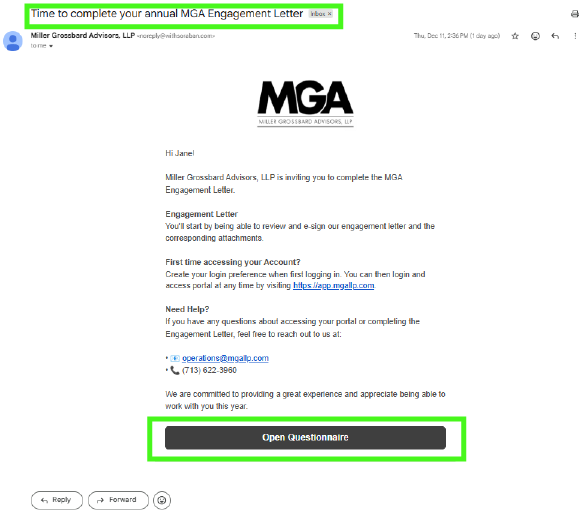
At the start of the new year, you’ll receive an email with the subject line: Time to complete your annual MGA Engagement Letter.
As soon as these go live, they’ll land in your inbox, so keep an eye out. That email will include a button prompting you to begin the process. When you’re ready, simply click that button.
Step 2: Log Into Your MGA Client Portal
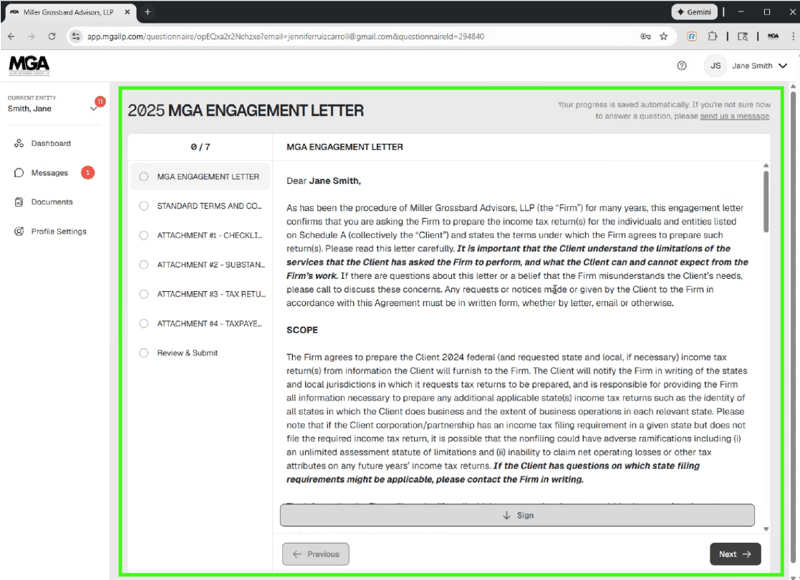
After clicking the button in your email, you’ll be taken straight to your MGA client portal login page. Enter your login credentials as usual. Once you’re logged in, the system will automatically open your engagement letter, as pictured below, so you can get started right away.
Step 3: Review Your Engagement Letter and Sign Where Required
Take a moment to read through everything carefully, as this document outlines:
- The scope of the work we’ll be doing for you
- Important responsibilities and timelines
- Any additional services that may apply to your situation
As you move through the engagement letter, you’ll see places that require your electronic signature. Simply follow the prompts, sign where indicated, and confirm your selections. The portal will guide you step-by-step, so nothing gets missed.
Step 4: Review and Submit
Before finalizing, the system will give you a chance to review everything one more time. Once you’re confident that everything is complete, click Submit.
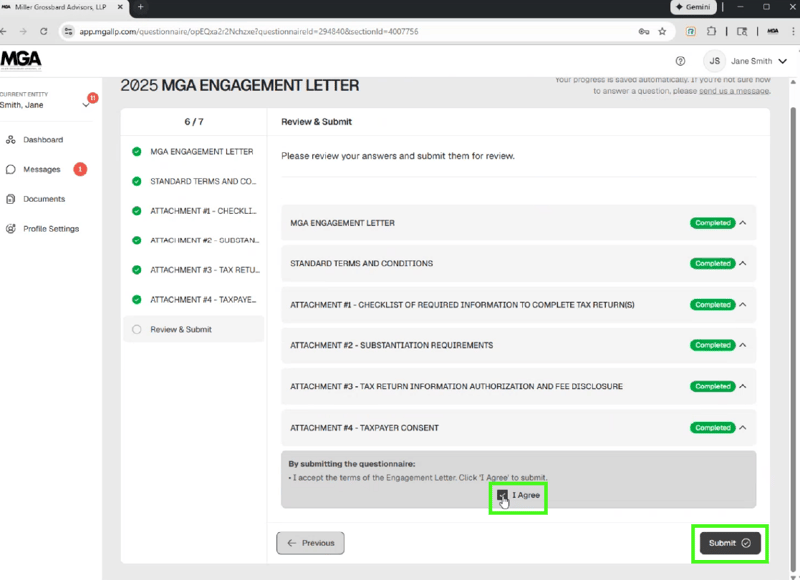
And that’s it. You’re done. Your engagement letter will be securely sent to our team, and you’ll be all set heading into tax season.
Have Questions? Please Ask!
We have an incredible team here who is happy to help you with any questions that may come up. Please don’t hesitate to reach out to us with any questions, via email or phone.
As always, we are here to make the complex simple.

.png)