---
title: How to Verify Your Identity to Sign Your Tax Return (Once Per Year)
description: See how to complete the once-per-year identity verification required to electronically sign your tax return through the MGA Client Portal.
image: https://blog.mgallp.com/hubfs/How%20to%20Verify%20Your%20Identity%20to%20Sign%20Your%20Tax%20Return%20(Once%20per%20Year).png
---
[](http://www.mgallp.com)
- [Client Portal](https://app.mgallp.com/)
- [Pay Your Invoice](https://mgallp.com/pay-your-invoice/)
- [What We Do](https://mgallp.com/your-problem-to-solve/)
- [Who We Help](https://mgallp.com/why-we-are-right-for-you/)
- [Insights](https://blog.mgallp.com)
- [Our Team](https://mgallp.com/our-team/)
- [Careers](https://mgallp.com/join-us/)
- [Let’s Connect](https://mgallp.com/contact-us/)
-
-
-
# **How to Verify Your Identity to Sign Your Tax Return (Once Per Year)**
.png?width=1200&height=720&name=How%20to%20Verify%20Your%20Identity%20to%20Sign%20Your%20Tax%20Return%20(Once%20per%20Year).png "How to Verify Your Identity to Sign Your Tax Return (Once Per Year)")
[](http://www.facebook.com/share.php?u=https%3A%2F%2Fblog.mgallp.com%2Fhow-to-verify-your-identity-to-sign-your-tax-return-once-per-year%3Futm_medium%3Dsocial%26utm_source%3Dfacebook) [](http://www.linkedin.com/shareArticle?mini=true&url=https%3A%2F%2Fblog.mgallp.com%2Fhow-to-verify-your-identity-to-sign-your-tax-return-once-per-year%3Futm_medium%3Dsocial%26utm_source%3Dlinkedin) [](https://twitter.com/intent/tweet?original_referer=https%3A%2F%2Fblog.mgallp.com%2Fhow-to-verify-your-identity-to-sign-your-tax-return-once-per-year%3Futm_medium%3Dsocial%26utm_source%3Dtwitter&url=https%3A%2F%2Fblog.mgallp.com%2Fhow-to-verify-your-identity-to-sign-your-tax-return-once-per-year%3Futm_medium%3Dsocial%26utm_source%3Dtwitter&source=tweetbutton&text=How%20to%20Verify%20Your%20Identity%20to%20Sign%20Your%20Tax%20Return%20%28Once%20Per%20Year%29) [](mailto:?subject=Check%20out%20https%3A%2F%2Fblog.mgallp.com%2Fhow-to-verify-your-identity-to-sign-your-tax-return-once-per-year%3Futm_medium%3Dsocial%26utm_source%3Demail%20&body=Check%20out%20https%3A%2F%2Fblog.mgallp.com%2Fhow-to-verify-your-identity-to-sign-your-tax-return-once-per-year%3Futm_medium%3Dsocial%26utm_source%3Demail)
4 min read
When you sign your tax return electronically through the [MGA Client Portal](https://app.mgallp.com/), you may be asked to verify your identity before completing the process. This verification is required once per year and helps protect your information while ensuring compliance with IRS security requirements.
The process is quick and secure, typically taking less than two minutes to complete. To make it as simple as possible, we’ve included a short video tutorial below that walks you through the entire process step by step.
If you prefer written instructions or would like to follow along as you complete the steps, you’ll find the full step-by-step guide below the video.
### **Step 1: Confirm Your Identity Code**
The first time you sign a tax return each year through your client portal, you'll be required to verify your identity.
When prompted, click the "Start Identity Verification" button.
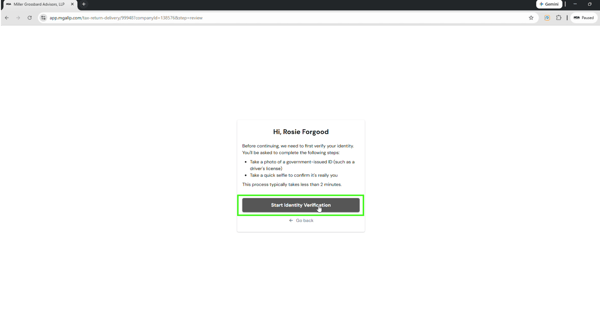Our portal partner works with Stripe to securely confirm your identity and will guide you through a simple verification process that only takes a couple of minutes.
First, you'll receive a verification code by email. Enter that code when prompted to confirm your identity.
### **Step 2: Continue on Your Mobile Device**
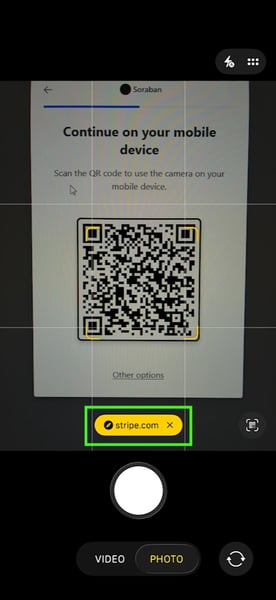
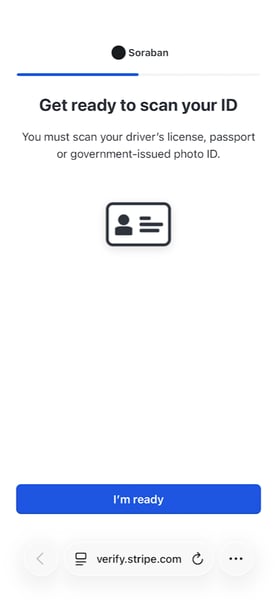
You'll then be asked to continue the process on your mobile device. Open your phone's camera app and scan the QR code displayed on your computer screen. This will open the secure verification page on your phone.
|  |  |
| --- | --- |
### **Step 3: Scan Your ID and Take a Selfie**
From your mobile device, you’ll be asked to complete a few quick steps to confirm your identity:
You may also be asked to provide the last four digits of your Social Security number.
### **Step 4: Verification Complete**
Once you’ve submitted the requested information, your phone will display a message indicating that your details are being reviewed.
At the same time, your computer screen will automatically update once verification is complete, allowing you to continue reviewing and signing your tax return.
### **Important Notes**
Once your identity has been verified, you will not be prompted to complete this process again until the following year.
### Have Questions? Please Ask!
We have an incredible team here who is happy to help you with any questions that may come up. Please don’t hesitate to reach out to us with any questions, via [email](mailto:info@mgallp.com) or [phone](tel:713-622-3960).
As always, we are here to *make the complex simple.*
---
### Stay Connected
Want to stay up to date with our latest blog posts, educational videos, webinars, and more? [**Subscribe for instant notifications**](https://blog.mgallp.com/subscribe-now-instant-notifications) and get new content delivered straight to your inbox.
Prefer a monthly roundup instead? [**Subscribe to our newsletter**](https://blog.mgallp.com/subscribe-now-monthly-newsletter) for valuable insights and resources from our team of experts, all in one place.
And be sure to [**follow us on social media**](https://blog.mgallp.com/follow-mga-on-social-media) for timely updates, expert insights, and exclusive resources to keep you in the loop.
March 5, 2026
Posted in [Client Tutorials](https://blog.mgallp.com/tag/client-tutorials)
### Recent Posts:
[](https://blog.mgallp.com/ready-to-sign-your-tax-return-heres-what-to-know-about-the-irs-required-id-check)
[Ready to Sign Your Tax Return? Here’s What to Know About the IRS-Required ID Check](https://blog.mgallp.com/ready-to-sign-your-tax-return-heres-what-to-know-about-the-irs-required-id-check)
[](https://blog.mgallp.com/how-to-distribute-k-1-packages-through-the-mga-client-portal)
[How to Distribute K-1 Packages Through the MGA Client Portal](https://blog.mgallp.com/how-to-distribute-k-1-packages-through-the-mga-client-portal)
[](https://blog.mgallp.com/how-to-review-sign-and-pay-your-tax-return-through-the-mga-client-portal)
[How to Review, Sign, and Pay Your Tax Return Through the MGA Client Portal](https://blog.mgallp.com/how-to-review-sign-and-pay-your-tax-return-through-the-mga-client-portal)
[](https://blog.mgallp.com/the-mga-client-portal-resource-hub)
[The MGA Client Portal Resource Hub](https://blog.mgallp.com/the-mga-client-portal-resource-hub)
### Let's Connect
### [(713) 622-3960](tel:(713)%20622-3960)
600 N. Shepherd Drive, Suite 200
Houston, TX 77007
Miller Grossbard Advisors, LLP is an independent member firm of [PrimeGlobal](https://primeglobal.net/), an association of independent accounting firms. PrimeGlobal is one of the five largest associations of independent accounting firms in the world, providing a wide range of tools and resources to help member firms furnish superior accounting, auditing, and management services to clients around the globe.
Miller Grossbard Advisors, LLP places strong emphasis on maintaining the highest level of professional excellence. The Firm is a member of the Employee Benefit Plan Audit Quality Center. We maintain a rigorous quality control system to verify that our auditing practices follow both professional and Firm standards.
Copyright © Miller Grossbard 2026. All Rights Reserved. – [Privacy Policy](https://mgallp.com/privacy-policy/)
```json
{
"@context" : "https://schema.org",
"@type" : "BlogPosting",
"author" : {
"@type" : "Person",
"name" : "MGA Team",
"url" : "https://blog.mgallp.com/author/mga-team"
},
"dateModified" : "2026-03-05T22:04:11.473Z",
"datePublished" : "2026-03-05T21:40:59.000Z",
"headline" : "How to Verify Your Identity to Sign Your Tax Return (Once Per Year)",
"image" : [ "https://blog.mgallp.com/hubfs/How%20to%20Verify%20Your%20Identity%20to%20Sign%20Your%20Tax%20Return%20(Once%20per%20Year).png" ],
"mainEntityOfPage" : {
"@id" : "https://blog.mgallp.com/how-to-verify-your-identity-to-sign-your-tax-return-once-per-year",
"@type" : "WebPage"
},
"publisher" : {
"@type" : "Organization",
"logo" : {
"@type" : "ImageObject",
"url" : "https://blog.mgallp.com/hubfs/MGA%2035%20Logo.png"
},
"name" : "Miller Grossbard Advisors, LLP"
}
}
```